Cisco CCNA Exam Preparation: A Practical Guide to 200-301 (v1.1)
The Cisco CCNA (200-301) remains one of the most practical networking certifications you can earn. It proves you can configure and verify switching, routing, IP services, and basic security—and that you understand how automation is changing day-to-day network work. The current blueprint is v1.1, a minor update that keeps the same six domains while refreshing topics such as AI in operations and modern configuration tools.
This guide walks through official exam facts, the six weighted domains, a realistic study plan, common mistakes, and how practice exams help. Always confirm details on Cisco’s CCNA exam page and the official exam topics (PDF: 200-301 CCNA v1.1).
CCNA exam overview (200-301 v1.1)
From Cisco’s published exam information:
- Exam code: 200-301 CCNA
- Current version: v1.1 (last day to test v1.1: February 2, 2027; v2.0 begins February 3, 2027—confirm on Cisco if your date is close)
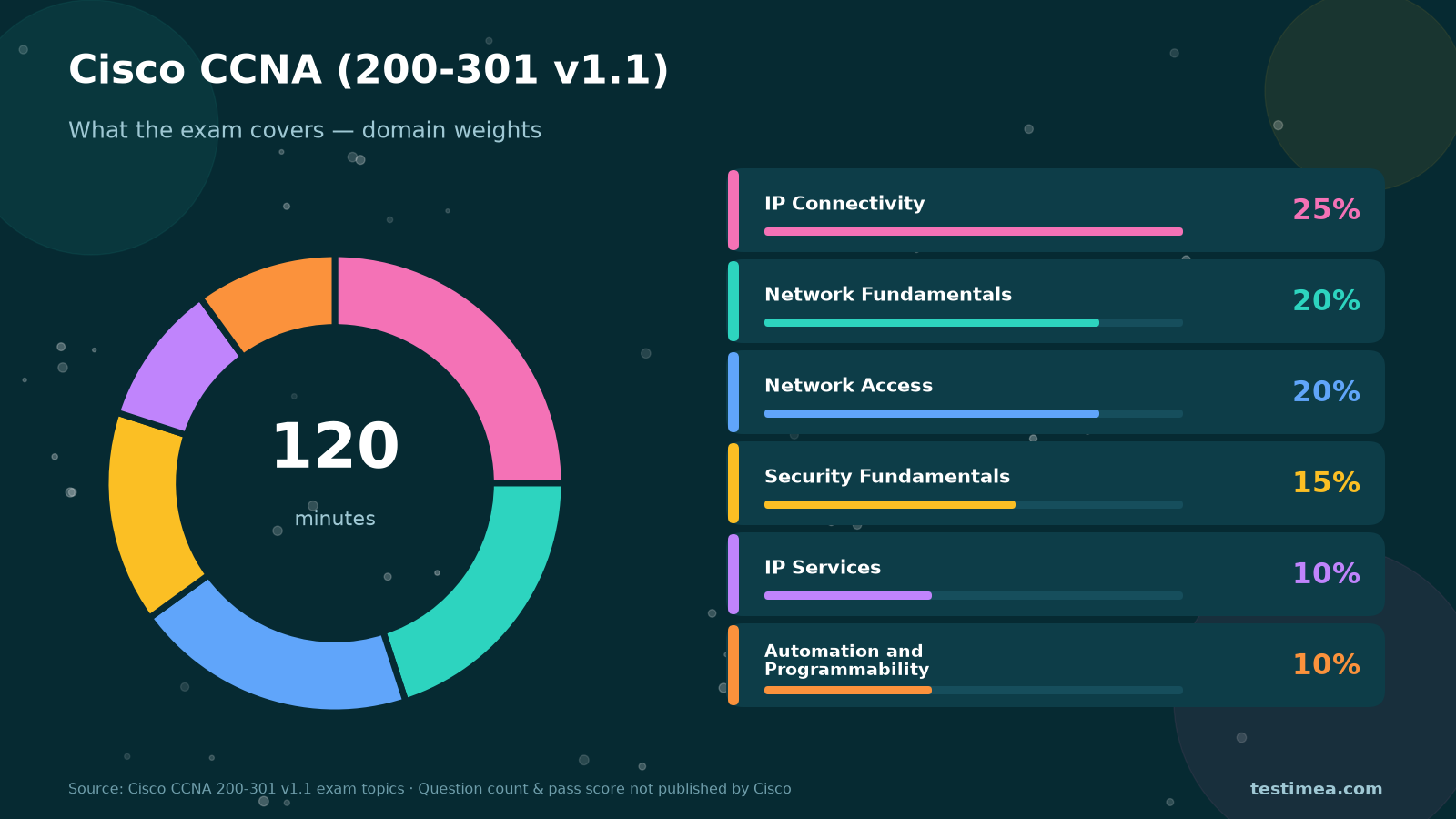
- Duration: 120 minutes
- Price: USD 300 (or Cisco Learning Credits)
- Languages: English, Japanese
- Question types: Multiple choice, drag-and-drop, and performance-based items (Cisco provides an exam tutorial)
- Results: Pass/fail, typically available online within about 48 hours
What Cisco does not publish: an official question count or a numeric passing score. Third-party estimates exist, but treat them as unofficial. Prepare to demonstrate competence across the blueprint, not to chase a rumored cut score.
The six CCNA domains (and how to weight your study)
Official domain weights from the Cisco CCNA 200-301 v1.1 exam topics:
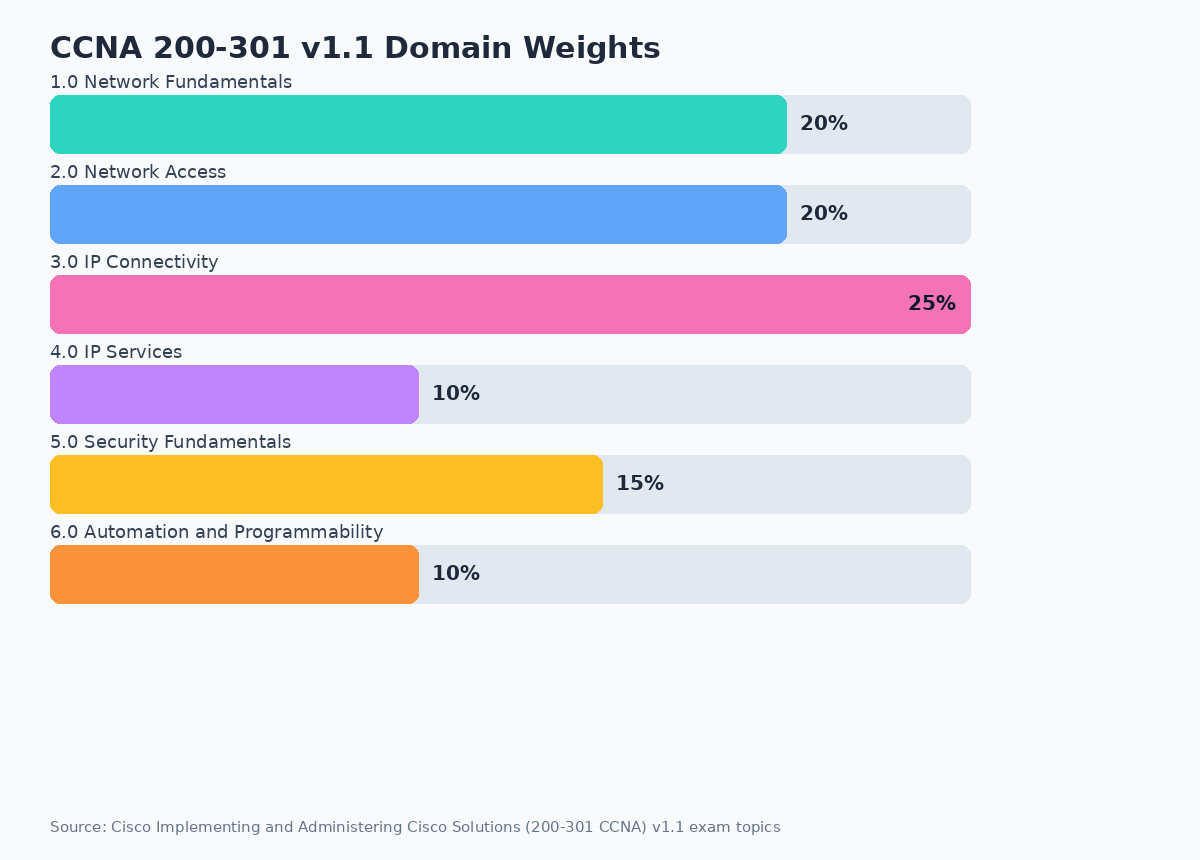
1.0 Network Fundamentals (20%)
Roles of routers, switches, APs, firewalls, and controllers; topologies (two-tier, three-tier, spine-leaf, SOHO, on-prem/cloud); cabling and interface issues; TCP vs UDP; IPv4/IPv6 addressing and subnetting; wireless principles; virtualization basics; switching concepts (MAC learning, flooding). Subnetting fluency is non-negotiable.
2.0 Network Access (20%)
VLANs, trunks, EtherChannel, Rapid PVST+ Spanning Tree concepts, wireless architectures, and device management access (SSH, HTTPS, TACACS+/RADIUS, cloud-managed). Expect configure-and-verify style questions, not just theory.
3.0 IP Connectivity (25%)
The largest domain. Routing table components, static routing, and single-area OSPFv2 fundamentals dominate. If packets do not reach a destination in a lab, you should be able to explain why from the routing table alone.
4.0 IP Services (10%)
NAT, NTP, DHCP/DNS roles, SNMP, Syslog, QoS concepts, SSH, FTP/TFTP, and related operational services. Smaller weight—still easy points if you practice the CLI workflows.
5.0 Security Fundamentals (15%)
Threats and mitigations, device access control, password policies, VPNs at a conceptual level, ACLs, Layer 2 protections (DHCP snooping, DAI, port security), AAA concepts, and wireless security (WPA2/WPA3). Security questions often combine with access or services scenarios.
6.0 Automation and Programmability (10%)
Why automation matters, controller-based vs traditional networks, SDN ideas (overlay/underlay, northbound/southbound APIs), REST API characteristics, and configuration tools (including Ansible and Terraform on v1.1). Also know the high-level role of AI/ML in network operations that v1.1 added. You do not need to be a developer—you need clear vocabulary and comparisons.
A practical 8–12 week study plan
CCNA rewards labs more than passive video. Absolute beginners often need 10–12 weeks. People with helpdesk or junior network experience can compress to about eight. Use practice performance—not calendar optimism—as your booking signal.
Weeks 1–3: Fundamentals and subnetting
- Download the official v1.1 topics PDF and highlight every objective you cannot demo.
- Drill IPv4 subnetting daily until you can do common masks without a calculator.
- Learn the OSI/TCP models through packet path stories, not memorization alone.
- Build a simple Packet Tracer / CML / physical lab: two switches, one router, a few PCs.
Weeks 4–6: Switching and wireless access
- Configure VLANs, trunks, and EtherChannel; break STP on purpose, then fix it.
- Practice show commands until output feels readable under time pressure.
- Cover WLC/AP basics and management access methods from the blueprint.
Weeks 7–9: Routing, services, and security
- Static routes and single-area OSPF: adjacency, LSAs at a CCNA depth, default routes.
- NAT, DHCP, NTP, ACLs, and Layer 2 security features—configure, verify, troubleshoot.
- Start mixed practice questions after each lab day.
Weeks 10–12: Automation + exam simulation
- Review Domain 6 with flashcards and short comparisons (Ansible vs Terraform, REST verbs, SDN planes).
- Sit two or three full timed practice exams in 120-minute windows.
- Remediate by domain; rebuild any lab you still cannot configure from a blank console.
Short timeline? Keep subnetting and Domain 3 intact; cut optional reading before you cut labs.
Practical tips for exam day
- Do the performance-based items calmly. Read the full topology before clicking.
- Write down a subnetting scratch method when the exam allows notes—speed matters.
- Trust show commands. Many stems are solved by interpreting output, not guessing keywords.
- Do not ignore Domain 6. Ten percent is enough to flip a near miss if you skip it.
- Flag long items and return. Two hours goes quickly with labs plus multiple choice.
- For general pacing habits across certifications, see our exam preparation tips.
Common mistakes CCNA candidates make
- Watching without configuring. CCNA is a hands-on exam; recognition is not the same as verification.
- Weak subnetting. Everything downstream—VLANs, ACLs, OSPF—gets harder if addressing is slow.
- Studying only multiple choice. Drag-and-drop and lab-style items need separate practice.
- Using outdated blueprints. Confirm you are on v1.1 topics (and watch the Feb 2027 v2.0 transition if your plan stretches that far).
- Brain dumps. They violate Cisco policy and teach brittle patterns. Follow the official topics list instead.
How practice exams help for CCNA
Labs build skill; practice exams build judgment under a clock. Useful practice should include timed Exam mode (scored, explanations after submit, flagging and notes) and untimed Practice mode (instant feedback, retries on weak domains). That loop—configure, test, remediate—is how most people finally feel ready for 200-301.
On Testimea, try the Cisco CCNA free trial first, then unlock the full CCNA practice exam. One-time purchase keeps the exam on your account. For a quick format check across topics, use the free sample exam.
FAQ
Is CCNA beginner-friendly?
It is an associate-level networking exam. Motivated beginners pass it, but expect months of labs—not a weekend cram—if you are starting from zero.
How many questions are on the exam?
Cisco does not publish an official question count. Prepare for a mix of item types inside a fixed 120-minute window.
What is the passing score?
Cisco reports pass/fail and does not publish a public numeric cut score for CCNA. Focus on blueprint coverage and consistent practice performance.
Should I wait for CCNA v2.0?
If you need the cert soon, take v1.1 while it is live (through February 2, 2027 per Cisco’s Learning Network note). If your timeline extends past that, follow Cisco’s v2.0 topics before you buy a long training package.
Start your Cisco CCNA exam preparation
Pull the official v1.1 topics, schedule daily labs, and weight your time toward IP Connectivity, Network Fundamentals, and Network Access. When you want timed rehearsal with clear explanations, try the CCNA free trial on Testimea or unlock the full practice exam. Configure, verify, remediate—then book when your practice feels boringly consistent.