GitHub Copilot Certification (GH-300): What Changed in the August 2026 Skills Outline
Microsoft has refreshed the skills outline for Exam GH-300: GitHub Copilot. The official study guide now lists “Skills measured as of August 7, 2026”, and the certification page shows the same last-updated date. The update is evolutionary: the change log adds or removes no skill groups, and Microsoft rates the changes as minor. The objectives now spell out Copilot CLI, Agent Mode, MCP, Agent Sessions and sub-agents. This guide covers what the official change log says, the full current outline with weights, the verified exam facts, and a hands-on plan to prepare.
What changed on August 7, 2026
The GH-300 study guide has a change log comparing the outline before and after August 7, 2026:
| Skill area | Change (per Microsoft) |
|---|---|
| Audience profile | No change |
| Use GitHub Copilot features (skill group) | No change |
| Use GitHub Copilot in the IDE | Minor |
| Use GitHub Copilot features and capabilities | Minor |
| Configure privacy, content exclusions, and safeguards (skill group) | No change |
| Apply safeguards and troubleshoot | Minor |
Two things to note. First, no skill group was added or removed, and Microsoft doesn’t publish a separate set of “old” weights, so there is no before-and-after weight comparison. The weights below are the current official ranges. Second, Microsoft labels the changes “minor” but doesn’t publish a line-by-line diff. So instead of guessing which bullet is new, it’s safer to study every objective in the current outline. That outline now names:
- Triggering Copilot through inline suggestions, chat, CLI and agent mode in the IDE
- A Use GitHub Copilot CLI section: what it is, installing it, key features and commands, interactive and session use, and generating scripts and managing files
- Agent Mode, Copilot Edits and MCP, plus managing Agent Sessions and delegating tasks to Sub-Agents “for optimized context usage”
- Spaces, Spark, pull request summaries and custom review standards set through instructions files
- Prompt file reuse for consistent Copilot Chat responses
GH-300 skills measured and weights
| Skill group | Weight | Key objectives |
|---|---|---|
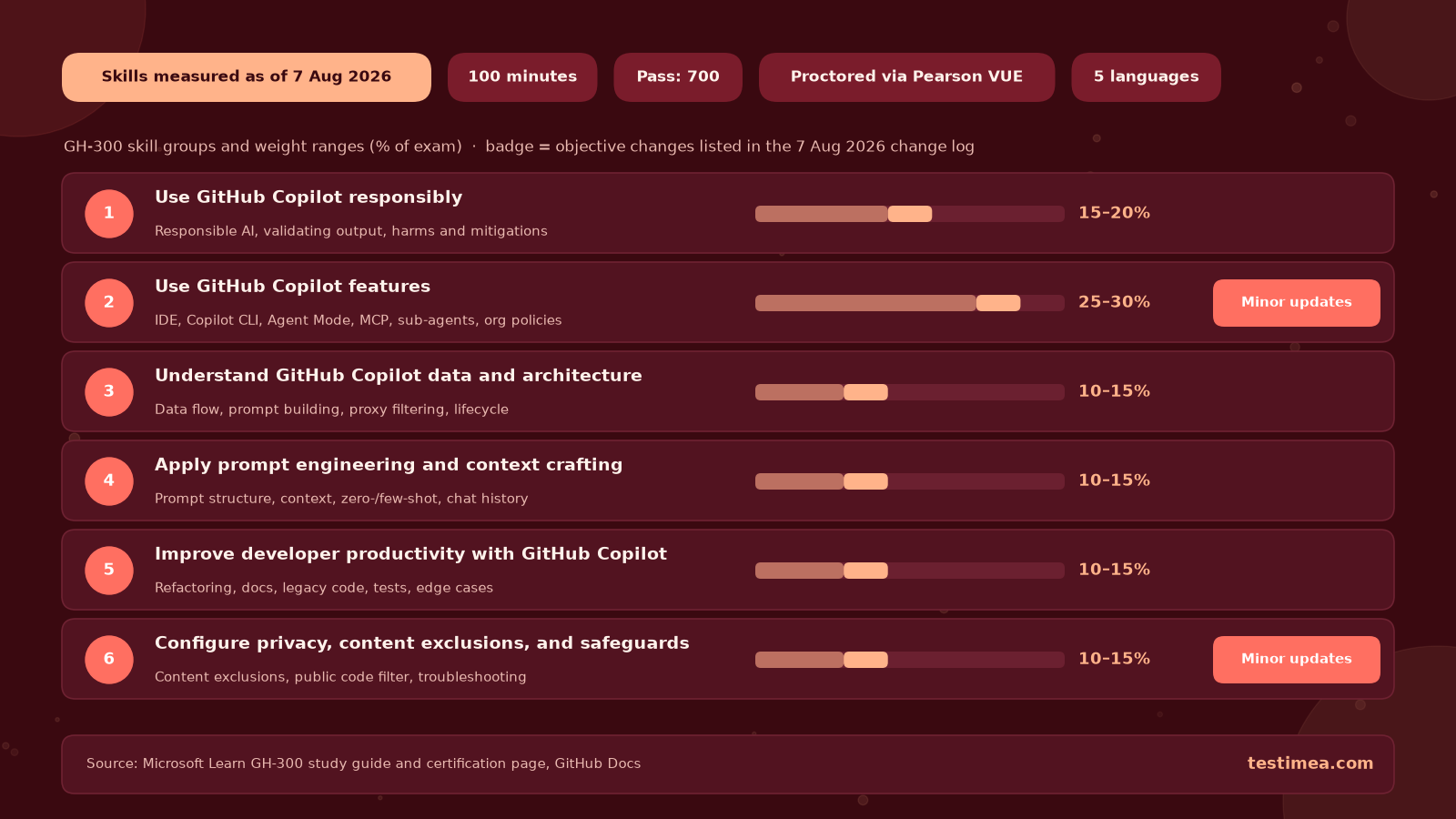
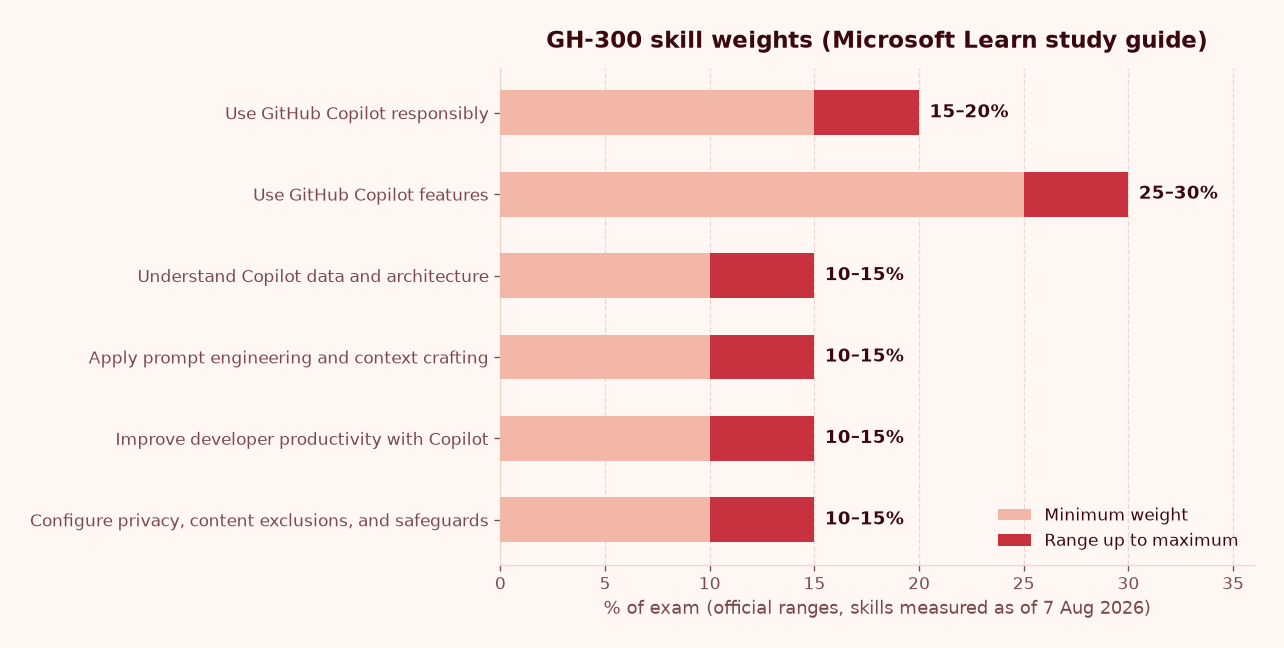
| Use GitHub Copilot responsibly | 15–20% | Risks and limits of generative AI, ethical use, harms and mitigations, validating AI output |
| Use GitHub Copilot features | 25–30% | IDE, Copilot CLI, Agent Mode, Edits, MCP, sub-agents, code review, Spaces, Spark, org policies, audit log events, managing subscriptions with the REST API |
| Understand GitHub Copilot data and architecture | 10–15% | Data usage and flow, prompt building, proxy filtering and post-processing, suggestion lifecycle, LLM limits |
| Apply prompt engineering and context crafting | 10–15% | Prompt structure and context, zero-shot and few-shot prompting, best practices, chat history |
| Improve developer productivity with GitHub Copilot | 10–15% | Generation, refactoring, documentation, sample data, legacy modernization, unit and integration tests, edge cases |
| Configure privacy, content exclusions, and safeguards | 10–15% | Content exclusions, editor settings, output ownership, the public-code matching filter, troubleshooting |
One small oddity: the “Skills at a glance” list on the study guide also shows a separate “GitHub Copilot features (25–30%)” line. The detailed outline has only six skill groups, so that extra line looks like a duplicate. Plan your studying around the six groups above.
Exam format: the verified facts
- Duration: 100 minutes. The exam is proctored and may include interactive components (Microsoft Learn certification page).
- Passing score: 700 or greater (exam scoring).
- Scheduling: through Pearson VUE. The price depends on the country or region where you take the exam, so check it when you book.
- Languages: English, Spanish, Portuguese (Brazil), Korean and Japanese. Localized versions are updated about eight weeks after the English one. If your language isn’t available, you can request an extra 30 minutes.
- Level: Intermediate.
- Retakes: you can retake 24 hours after your first attempt. Waits for later retakes vary (retake policy).
- Validity and renewal: the certification page says GitHub certifications are valid for 2 years. GitHub is moving to Microsoft’s recertification process. Certifications that expire before that process is ready get a 6-month extension.
- Preview features: most questions cover generally available features, but commonly used Preview features can appear.
Microsoft does not publish a fixed question count for GH-300, so be wary of any number you see quoted.
Who is GH-300 for?
Microsoft’s audience profile targets people with expertise in using GitHub Copilot to improve software development productivity, quality, and security. That includes responsible AI use, prompt engineering, Copilot features across plans, and privacy safeguards. You should also know GitHub fundamentals and have experience with at least one programming language. In practice, that means developers, tech leads, and the admins who manage Copilot policies for an organization, since org settings, audit logs and subscription management are all in scope.
A 4-week, hands-on study plan
The study guide recommends hands-on experience. You’ll need an active Copilot plan for the practical exercises.
| Week | Focus | Hands-on |
|---|---|---|
| 1 | Responsible AI, data and architecture | Work through GitHub Copilot Fundamentals Part 1. Trace how a prompt is built, filtered and post-processed, and practise checking suggestions before you accept them. |
| 2 | IDE features, Agent Mode, Edits, MCP, sub-agents | In your editor, compare ask, edit and agent workflows. Connect an MCP server and try subagents, which run tasks in their own context window. |
| 3 | Copilot CLI, prompting, productivity | Install Copilot CLI (for example npm install -g @github/copilot). Run an interactive session with copilot, and a one-off prompt with -p. Practise zero-shot vs few-shot prompts, and generate tests and refactors. |
| 4 | Org policies, privacy, review | Complete Fundamentals Part 2. Set up content exclusions and the public-code filter. Take timed practice exams and review every miss. |
For realistic timed practice, our GitHub Copilot (GH-300) practice exam follows the August 2026 skill groups and explains every answer. To try it first, the GH-300 practice exam trial costs $1, and that $1 is deducted when you upgrade to the full version. Microsoft’s own Practice Assessment on the certification page is also worth doing.
Common traps
- Assuming every feature is on for everyone. If you get Copilot through an organization, its Copilot CLI policy must be enabled before you can use the CLI. The “MCP servers in Copilot” policy for Business and Enterprise is disabled by default (GitHub Docs: Copilot CLI, MCP).
- Ignoring the risk of auto-approval in the CLI. With options like
--allow-all-tools, Copilot can run any shell command you can, without asking first. Expect responsible-use questions on this. - Mixing up CLI modes. The CLI has an interactive interface (with a plan mode you switch to with Shift+Tab) and a programmatic interface (
-p/--prompt). - Thinking sub-agents share the main chat’s context. They work in their own isolated context window and return only the result. That’s why the outline mentions “optimized context usage”.
- Treating content exclusions as a privacy-only topic. Exclusions also appear under IDE use, and “resolve issues with suggestions and content exclusions” is a troubleshooting objective.
- Studying an old outline. Older material organised around topics such as “Testing with Copilot” won’t map cleanly to the current six groups, and it may skip CLI, MCP and agent topics.
Next steps after GH-300
Want to broaden your GitHub skills? Try our GitHub Actions practice exam or the GitHub Advanced Security practice exam.
FAQ
When did the GH-300 outline change?
The study guide lists “Skills measured as of August 7, 2026”, and the certification page shows the same last-updated date.
Did the domain weights change?
Microsoft’s change log reports no added or removed skill groups and publishes no separate previous weights. The current ranges are 15–20% for responsible use, 25–30% for features, and 10–15% for each of the other four groups.
Is Copilot CLI on the exam?
Yes. The current outline has a “Use GitHub Copilot CLI” section covering installation, key commands, interactive and session use, and scripting and file management.
How long is the exam and what score do I need?
You have 100 minutes, and you need a score of 700 or greater to pass.
How long is the certification valid?
According to the Microsoft Learn certification page, GitHub certifications are valid for 2 years while GitHub moves to Microsoft’s recertification process. Check the page for the latest renewal details.
All exam facts come from Microsoft Learn and GitHub Docs as of October 2026. Always check the official certification page before you book.